Friday, July 8, 2011

My summer assignments

My to-do list for the summer:

  • rebuild/create website for my students' to blog and access resources
  • check out how other people have done that
  • practice on new online classroom platform (Zen live)
  • learn or learn more about how to use:
    • tweetdeck
    • moodle
    • googleapps for education
    • geogebra
    • nota
    • evernote
    • vimeo
    • delicious
    • edmodo
    • flickr
  • take a break at some point
Wish me luck!

Monday, July 4, 2011

Flipping 101

I've been running into lots of teacher friends over the course of the summer, what with us all being on vacation, and as it turns out, lots of people are interested in hearing more about flipping the class. I'm also hoping to do a presentation about flipping at the next QPAT convention here in Montreal (if they accept my late proposal, that is), so hopefully this post will help me prepare for that. I'm sure someone else has already written something like this before, but here is my attempt nevertheless at outlining the basics of flipping, as well as ideas for more advanced flipping.

What is "flipping the class"?

What gets flipped are the time and place that the teaching and the homework happen. The teaching happens outside of class time, and the work is done during class time, which represents the opposite of what most of us experienced in school.

In order to do this, a certain amount of technology is involved.  Flipping the class isn't about the technology, BUT how successful it is certainly depends on access to and facility with technology. For example, computers with internet access for your students are a huge advantage, if not absolute necessities. The most common vehicle of delivery of the lessons is via some kind of internet site, although some teachers provide their students with CD's, which of course would still require a computer to be viewed. Then there are the many tools that the teacher needs in order to make the lessons and keep track of their students' progress. I hope that doesn't scare anyone off the idea, because there is a TON of support out there for anyone who wants to have at it, including my own humble blog. You are reading the ravings of someone who does not know a lot, but has been able to progress nevertheless!

Why flip the class?

Well, it turns out that this simple idea produces some pretty amazing results. For example:
  • You no longer have kids saying to you "I couldn't do the homework. I understood it when you did it in class, but when I got home I just stared at it and didn't get it anymore."
  • You have more time to help kids during class, and I mean kids at both ends of the ability scale. Those that need help can get it from you OR their peers, and those that are interested in going deeper can do the same.
  • Your kids become more responsible for their own learning, by virtue of the fact that they control the speed with which they work through the lessons and the assignments.
How do you do it?

I have just started, so I am a relative newbie. I started in March of this past school year (2010-2011), so I will tell you what I have done, as well as what some of the more advanced flippers have done. Keep in mind that it's all a work in progress for me and, really, for everybody. I have chronicled a lot of my experiences in older posts right here on this blog, so if you are interested in how it all actually unfolded so far, please see the archives beginning in March. For now, here are the basics:

1. Give your students access to a recorded lesson.

You can either find one that someone else has already created, like for example, one of the 2000 or so free ones at Khan Academy, or you can make your own. I prefer to make my own because I want my students to hear my voice. Most of the teachers seem to prefer making their own, or teaming with other teachers at their own school, for the same reason - familiarity and comfort for our students.
  • What tools you use to make this recording is up to you of course - many use Camtasia, which I would love to try, but for now I am using Voicethread. Here are some of mine from the week of May 16:
  • Voicethread: In an earlier post, I talked about how I make, use, and share voicethreads, so if you're interested, it's all there somewhere. Yes I am lazy. Or you can find out more at voicethread.com. 
  • Smart Notebook Recorder: I would think that anyone with a smartboard would be able to use the built-in recorder to make their lesson recordings. Whatever you use, make sure your students can open it at home. As far as I know, the problem with using Smart Notebook is no kids have it at home, because it is SO not free. Maybe it's possible to export it to some kind of mpg format? Not sure.
  • How you make it available to your students - if you're creating a video you can upload it to a website, or give them a CD if they don't have internet at home. For voicethread, the recording is stored on the voicethread site, so I just give them a link to the recording. More advanced teachers have a class site like a wiki, to which they upload their lessons.
2.  At the next class, assign work for your students to do to process the lesson. 
  • For everyone who has listened to the lesson, you are now ready to give them something to do. You can just stick with the usual textbook problems, or worksheets, or you can get more creative. The point here is to get them to do something during classtime so that they have immediate access to someone - either you or another student - to help if they need it.
  • I  found very quickly that I was compelled to do more interesting activities in class, (see post "Flipping with Fun Audrey") as well as assigning them more creative tasks, like using geogebra, or getting them to generate questions for a partner. It just felt like such a golden opportunity to get them to do more interesting things than just drill and practice. You can see one such activity in an earlier post that I did - it's a doc called operations on vectors. Still lazy.
  • This is where you get to spend the most amazing time with the kids - individually or in small groups. You will find that the learning that happens is more authentic, because it will be tailored to the immediate needs or interests of the student. It will be a correction, or a suggestion, or an enrichment offered just in time.
3. Make it possible for them to go at their own speed.
This is why flipping has been called the magic bullet for differentiation. They can go as slow as they need to, or as fast as they want to.
  • Which means you have to have as many lessons and assignments as you can ready to go in advance so that the keener beaners can go ahead. This is quite a challenge for the first year that you are flipping, as it takes time to put together a recording that you are happy with. Some mixing of your stuff and other peoples' stuff will likely be necessary. Feel free to use any of my powerpoints/voicethreads, such as they are!
  • Next year, I plan to get them to watch a variety of lessons on the same topic, and get some critiquing from them. For the time being, I would still like them to start with me, then compare with other teachers. Maybe I am still a bit egocentric that way...
4. Check in with each student on a regular basis.
Of course you want to make sure they are working their way through the course in a timely fashion, and grasping it as they go, so you need to have some system of keeping track, for the purposes of evaluation and pacing.
  • Some teachers have a regular Friday check-in/evaluation routine. Zero for anything not done type of thing. I use an online checklist that I created using googledocs, mainly because I don't get to see my students face-to-face. Every few tasks in the checklist is something they have to hand in to me, so that I can mark it. I also include online quizzes for them to assure themselves that they are on the right track before they zoom to the next lesson. Some of these quizzes are found at explorelearning, and some I create also using googledocs. Here is a checklist from the week of May 16:
  • Next year I will be using the googledocs assessment system, created by Andy Schwen, about which I wrote in another post.
5. Share with other teachers who are flipping. Join twitter and/or the flipped teacher ning at http://vodcasting.ning.com/ 

Because, as I said, a lot of technology is really necessary, and a lot of time needs to go into creating good materials, and hey, we're all in this together!

Thursday, June 16, 2011

Exam time

...and the results, like usual, make me feel like the crappiest teacher ever, which can only mean they make my students feel the same way. About me AND themselves!

Thursday, May 19, 2011

Blipping report

Haven't posted for a looooong time mainly due to bad neck and shoulder pain, which is definitely related to being on the frackin computer all day. But I've been thinking of you, my little blog!

So I've been continuing the flipping with all my grade 11's, combined with getting them to blog, as well as getting them to indicate their progress on the googledocs checklist.

Interesting things: Blog posts/comments:
  • The blog posts/comments are a lot more interesting now, as a result of flipping. I adapted the scribe post model to reflect the fact that they are not all doing the same thing at the same time. They now can blog or comment on the lesson they're currently watching, or the activity they're currently doing, or anything else they want to share - for example, Stephen posted about his own work habits:
    Today I’m not going to blog about how I completed the task list then mention some complication I came across. Today I’m blogging about the task list itself.
    I find that the task is a pretty efficient tool when combined with the voice threads. Personally I prefer to work at my own pace, and the task list allows me to do so. I can run through the tasks on the list pretty quickly (as can most of us in the class I assume), so that gives me a lot of free time to work on other subjects that are a little more highly pressured at the moment, or even spend time getting ahead in review for the final exam.
    One of the best parts about the checklist is that we’re given a daily list that when followed, will have you finished by the end of the week. While most of us could get way ahead in the checklist and have much less math to do for the rest of the week, I personally find that I prefer to follow the daily schedule, so that I can balance out the work with my other subjects that might need a bit more attention, seeing that exams are coming up.
    However, I do think that it requires students who are willing to complete work without many checkups on our progress. You could say it’s more of a mid to end year thing, seeing that working like this at the beginning of the year could give you a habit of procrastination.
  • Blog conversations have more authenticity to them - check this out, after I showed them this youtube video (thanks to Kate Nowak for finding and posting about it!). An actual conversation ensued, and I found out that one of my students is planning to be a pilot:
Today in class miss showed us a video about cross-wind plane landings and I have to say it scared me quite a bit. Vectors can really be dangerouse. Ill wear a hemet next time i do my homework:P Btw: I really love when miss gives us videos to watch. I find it useful to see how what we are learning actually happens in real life.:):):)
Today, Mrs Mcgoldrick showed us a video about Scary Aircraft Landings.
Here’s the link if you might want to re-watch: (Not sure if the link will work…)
<a href=”http://www.youtube.com/watch?v=5X_7Xt2ga-s”>The video simply shows an extreme scary crosswind landings. It is not just about how they approach to land but how the pilot balanced an aligned land on the runway to and on a better angle. Sometimes it also depends which way is the wind blowing.
      •  
        kristopher says:  Yah it looks pretty scary of how the pilots come in sideways with crosswinds especially as a passenger on the plane or even an observer. The wind causes the plane to go sideways especially on landing when the plane is trying to do so many things. Even thought this looks scary, pilots are trained to land liek this in these conditons. Before they land they know the magnitude and direction of the wind. So if it’s a crosswind, then the plane shifts to the side. To counteract this, one of the things the pilots do is by using the rudder peddle, this shifts the rudder on the plane. This quickly turns the plane back straight just before they land. Pilots dont do it right away because the plane can over transistion. Pilots also have to follow different techniques while landing like change in flaps, speed and time of decent etc, but the main theing is the rudder peddles.:P The reason why i know this is because I want to be a pilot and I know a lot fo things and techniques of pilots:

        shelley says:  Yeah the video was pretty awesome and scary at the same time! We really can observe how wind affects the trajectory of the plane. I certainly wouldn’t want to be in one of those planes in those situations

        fred says: Same here Kris I wanted to be a pilot but my eyes are to bad Also the pilots turn the plane so the engine thurst is aimed in a direction that will cause the plane to fly straight, while its side ways. They have to reduce the engine thrust so its low enough that the wind pushes the plane. This is just like adding vectors, the resulting vector would be or should be aimed straight down the runway. This can be dangerous because if the speed is reduced to much the plane can stall, which measn theres not enough lift under the wings to kepp the plane up. Also like Kris said if u give to much rudder the pilots can completly lose control of the plane. Its rough stuff
Interesting things: the googledocs checklists

  • The checklists continue to be an amazing tool for me. I found out that you can rearrange the results spreadsheet so that it shows you just one student at a time, and when I do that, I can see this:
  • Because it's in order by date, it's like a graph of the speed at which this child is working, as well as a simple checklist. I don't have to manually accumulate things.
  • If I am more interested in how many are done, say, activity A, than in who has done it, I can arrange the spreadsheet by simply going to that item, and selecting "done", and I get this:
  • .......so that I can know when it's time to process it together, or correct it.
  • I feel so absolutely empowered by this checklist! I realize now why I have suffered from being a wimpy teacher all this time. And by wimpy I mean not calling kids out on stuff that they really needed to be called out on. Like kids who don't do their homework - I can speak frankly to them about it because THEY have admitted to it in writing by virtue of the checklist! So that part of the discussion is done, which is the part I always had trouble with!
  • I have fallen into a pattern. First part of the class is about where the majority of the class is, and the second part is about individual students.
  • I start the class by discussing the work that the majority have finished, say activity A. Then they continue on their own, and I have individual talks, either initiated by them, or if not, by me!
Interesting things: Flipping
  • Really enjoying the private discussions. Because they are so much more authentic too. It's not only about the math, sometimes it's about how to use Microsoft Equation in Word, or about something that's happening in their lives, like a photography contest. And of course, sometimes, it's about them facing the music.
  • I am more comfortable with the silent class because: I can watch their progress via the checklists as they happen. I don't even have to refresh, it just constantly updates the spreadsheet.
  • I am also more comfortable because it actually isn't silent from my point of view, and that's because I am taking them one at a time into a breakout room (It feels like I'm a doctor seeing patients!)
  • What's missing in the online setting is the spontaneous collaboration that happens naturally in the brick and mortar setting. I remind them that they are allowed to work together, but that seems to only be happening with the kids who are in the same school, naturally. How to get it happening spontaneously between schools is a problem to be solved....
And I just found, through the flipping teachers ning, that you can also use googledocs to make up quizzes that immediately tell the student if they're right and then sends the teacher the results for the whole class. Why would google do that? Why are you so good to me google?

Thursday, May 5, 2011

First post-flip tests

Just corrected Tech Sci Math's first test since the flip - 81% average - pretty nice, by any standard! I still had two failures, and they were from students who usually do extremely well with the old model. Mind you, both were absent a lot during this unit, and so missed the class activities, and didn't manage to get caught up.

The most significant result is J, who got 80%, compared to discouraging results in every other test this year! Needless to say, this makes me really want to keep flipping! Just before giving them their marks, I asked them for their reactions to flipping. J said he found it a hassle, because it felt like there was more work to do this way. Then I told him his mark, and I bet he doesn't find it a hassle anymore! The rest of their responses varied, some preferred this way, some preferred the old way, and one said she is happy either way. One of the kids who failed, and who usually does much better, was not in favour of flipping, because she found it hard to remember to listen to the lessons at home. Which is weird, because when homework was just homework, she always remembered to do that.

My other group that was flipped, the grade 11 Science math, also had their first post-flip test. Class average was 73%, which is pretty standard for this group. My J for this group hasn't written it yet, though, and that's the one result I am most interested in.

Science math is getting flipped for their next unit as well, which is vectors.

As it turns out, Tech Sci Math is doing the unit that I just finished with Sci Math, and vice-versa. Which means that I already have a lot of material at the ready for each of these classes, which means I'll do an even better job of flipping this time around for both classes.

New this time around - geogebra worksheets, the googledocs task checklist, and the combo of flipping plus blogging.

Here are a few snapshots of their gorgeous geogebra worksheets, in which I gave them a set of instructions right in the geogebra file and they had to create various vectors using various criteria:


I love how colourful they are, and how geogebra automatically matches the colours of the vectors in the pic to their algebraic representations on the left.

And here is how the checklist is getting populated:


I've blocked out the names, but you can still see the info that is compiled for you - timestamp, name, etc. Really helpful in ways I hadn't even anticipated, like:
  • now I have a reminder to go look for kids' stuff once I see they've checked "done and uploaded".
  • I also have very concrete things to talk to individuals about during class, like "Where is that worksheet, why haven't you done it, c'mon cough it up!"

It's still about feelings

It seems that the main difference so far isn't the marks, it's more about how the whole process feels. It all feels so different to me. I am able to have those one-on-one conversations that I never had time to do before. I have time to go deeper into the content. I had hoped that that would give better test results, but so far that doesn't seem to be the case. So either things are at least as good as they were, or the test is not the best tool to measure whatever has changed as a result of flipping. Something has changed, no doubt about it.

Wednesday, May 4, 2011

More googleness

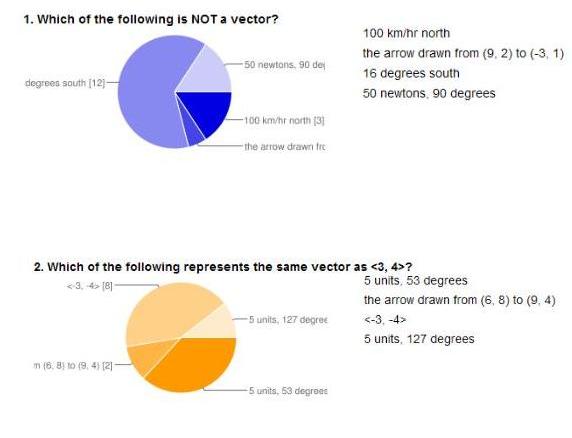
Just playing around again and discovered that Googledocs also gives me a summary of the quiz results for the whole class like this:


Nice visual, and saves me a lot of scanning their individual answers to see which question needs to be addressed with the whole class...thanks, Google!

Tuesday, May 3, 2011

What Googledocs does with the checklist:

Here's what I'll get after the students have checked off their items in the checklist I posted yesterday. I pretended to be a student, and I see that Peggy did too. Thanks, Peggy, and wow you're super up-to-date!