Wednesday, April 4, 2012

What to do with all that class time? It's been right under my nose all along.....

I remember when I first started flipping, I felt really uneasy during class, with all this face to face time.

For one thing, I missed seeing and hearing the kids' reactions to the lessons I had so lovingly prepared for them. No more laughing at my jokes. No more gasping when I, with great dramatic flair, revealed a stunning truth:


Gosh, I was good.....

But it also felt not busy enough. I lived in fear that someone might walk into my room (virtually of course) and get the impression that nothing was happening. I also knew that there just might be some kids who were not working....shocking, I know. I blogged about that here.

So I immediately started to create class activities, which I felt would take care of both those issues. We interacted during the activity, I got to joke around, they laughed and gasped, and they were visibly busy and engaged. One of those I blogged about here.

But let's face it, I am only one woman, and inspiration doesn't happen when you most need it to, and eventually I started to wonder how useful the activity was to the people for whom it was designed....

So what's been right under my nose all along? Student reflection.

I've been getting all kinds of info from my students all year, from voicethreads, blogs, and googledocs forms to name a few, but I haven't really been looking at it all the right way. All of it is rich reflection not only of the individuals, but the class as a whole.

Now I realize, thanks to my PLN on twitter, that there is a very logical reason for getting students to reflect: It is the best possible inspiration for what to do with the f2f time. I finally understand the brilliance of letting them determine what happens. But don't get me wrong, I won't start each lesson with "So what shall we do today on our math adventure kids?" We all know what kind of response that usually gets. And the last thing I want is for them to know that I am giving them that kind of power!

Instead, I will let their reflections tell me what to do. Starting with their comments on the voicethreads.

Yesterday, I saw some questions about this trig identity example from the previous night's voicethread:


Both questions had to do with cancelling out the two purple sinß's, which of course, you can't do. Aha - that's where I'll start today, talking about when you can and can't cancel common factors, but not just with the two who asked about it, with everyone!

Activities that resulted:

I put a trig expression on the board and polled them with a yes or no question: " To ccf or not to ccf?" (ccf is my abbreviation for cancel common factors....) And boy oh boy was it interesting to find out how many others needed to straighten out that particular detail. Even better, I let those who answered correctly explain, even decide how to explain, why you could or couldn't ccf. We did a few examples like this and that took about 15 mins. It occurs to me now that it had to have been timely not only for those who had already watched, but also those who hadn't. Cleared up some potential confusion hopefully.

Another vt comment lead to me polling them on who was feeling like this "Sure I can follow all the steps you're doing, miss, but I would never have known what to do next on my own." Talk about hitting the nail on the head - almost everyone said yes. Great relief all around! So we talked a bit about strategies, but here I have to admit, since it was such an overwhelming majority, I gave them my own tips. It felt like that was a time for me to reassure.

Note to self:

Let the questions and comments on the voicethread be the life of the class. That way they're not just another thing they have to do to prove they're up to date, and not just another thing for me to keep up with. They are living, breathing parts of the learning cycle.

I guess that's what was missing up till now. All this info that's been coming at me from the voicethreads, the gdocs forms, the student blogs.....I've been treating it like static pieces of info rather than dynamic parts of the evolving story of our class. Seems so obvious now.

Monday, March 19, 2012

Oh the Super-Humanity!


Where does the tool end and the human begin?

As I and my fellow online teachers continue to try out new tools and strategies to engage our students, I am noticing a certain ironic, and exciting, trend.  The very thing that one would think would interfere with authentic meaningful  human relationships, that is, technology, is actually having the opposite effect. The tools are actually evolving so that they make our communication more human. I would even go as far as saying some are transforming what it means to be human.

Texting is an example of a tool at the opposite extreme of authentic meaningful communication. By necessity of brevity, texting immediately jettisons most of the human touch, even with all those cute abbreviations.  ;-)  See?  Not human. Don't get me wrong - I have nothing against texting.  I text my own kids all the time! :)

But then we have wonderful tools like googledocs! The first time I experienced this enhanced human-ness was when I tried googledocs for the first time with my students.  Rather than go into all the details of the specific activity, I will just say that the students were all editing a single document, and they could all see what each other was typing as they were typing it. Each person's addition to the document was accompanied by a little callout with their name in it. That and the fact that we all saw the same thing in real time, made us all seem more flesh-and-blood to each other, myself included.  It was different than what we see in the chat box of the Zenlive classroom, even though that too is live and identifies each individual. I'm not sure why it felt so different; perhaps because it was a new place for us to gather and it just looked different
.
Next time I noticed it was when our online history teacher and edtech guru, Paul Rombough, showed us a video of a live Prezi activity that his students had done.  What we, and the students, saw was little Rocky-and-Bullwinkle type avatars scrambling all over a map of Quebec:
Each one of those little avatars had the name of a student attached to it, so once again, there was a human layering happening by virtue of the tool that was being used. In fact this one went two steps further than googledocs, because each student was given an actual human form and a location to add to their identity.

These examples had a huge impact on me. I found that instead of feeling that I had to go above and beyond to make sure I was getting through to my kids, and making them "see" me and their peers, the tool was doing that for me. Of course it was not only because of the callouts or avatars, but because of the collaborative nature of the task they were working on.

The super-humanity of the twitter chat

Now I have experienced a tool that makes it possible for us to "see" each other in ways that simply would not be possible without it.

I recently attended my first twitter chat. This simply means that I and many others went onto twitter at a pre-determined  time, searched for a pre-determined hashtag, and for the next hour, tweeted with that same hashtag.  It's kind of like being on a special twitter channel. There are many chats like this that happen on a weekly basis, like edchat, or mathchat, but the one that I finally decided to join in on was the flipped class chat, the hashtag for which is #flipclass.

I shall try to describe this experience.  Imagine yourself having five conversations at the same time, each one of them fascinating. Then add the fact that each of those 5 people you're talking to is someone highly innovative, respected, or just plain famous. Now add another dimension - on top of that, as you carry on these multiple conversations with these amazing people, other amazing people that you didn't even know were there respond to things you are saying and start even more conversations with you. And instead of 5, it's now more like 10. It simply could never happen in one room, or without a tool like twitter. Even with twitter, it's impossible to keep up all of the time, so the entire thing is recorded and posted for everyone to see the day after. And when I say see, I really mean it. Have a look at this.

With this tool, we can see not only what was said, but also directionality, intensity, and who the movers and shakers wereIt seems to me that this tool, and the twitter chat which it describes, makes it possible for us to process more information, more quickly, and in new ways. Maybe it even makes us superhuman? But then here's another irony - it certainly will take a super human to keep up with all the new tools that pop up everyday! Just when there are fewer and fewer phone booths around....

Thursday, March 1, 2012

Congruent Triangles à la Webtools

Just had THE most fabulous time with my grade 10's. It was the introductory lesson on congruent triangles, but I didn't want to say the words "Congruent triangles" and give anything away.

So I gave them this geogebra worksheet, created by Evan Weinberg. They moved the segments around to form a triangle, then took a snapshot using their snipping tool. Then they went to this googledoc to insert their snapshot. I made it clear that under no circumstances were they to shrink or enlarge their image, I wanted the actual size. After we got just a few of them inserted, I moved my own triangle outline over theirs, sometimes flipping, sometimes rotating, and lo and behold, we all had the same triangle. So sss demonstrated without words, only by doing and comparing.

Next, they all logged onto their explorelearning accounts, and started the Proving Triangles Congruent gizmo. Did a quick demo of how to measure sides and angles, how to select the conditions, and how to play around with the triangles to see if they are definitely congruent, or not necessarily congruent under those conditions. Then they worked in pairs to fill in the slides of this powerpoint, using snapshots from the gizmo to back up their statements:
I haven't even looked yet at their dropboxes to see how they did, but I am already struck by how many tools they are now comfortable using! Geogebra, snipping tool, googledocs, explorelearning gizmos, powerpoint, uploading to the CMS.....I just spoke with some McGill students last Tuesday night about, among other things, all these cool tools I and my students use, and one of them asked me if the kids ever get overwhelmed by all of them. I said I didn't think so, because I hadn't heard any complaints. but after today, I am convinced they are fine! At least with the half a dozen or so we used today, because they seemed to just click right along, in fact, some had even started it BEFORE class!

We'll see how it goes, but one way or another, it turned out SO much better than I thought it would. Maybe I'm not crazy after all!

Friday, February 24, 2012

Immortals in my class - who knew?!?!?

I have been getting really cheeky lately with my checklists. Maybe I'm just tired of seeing the same 2 or 3 possible answers, which means the kids are too. But I do like to amuse myself too! Here are a few samplers:

Desperate for comments on the voicethreads:

....and it looks really funny at the end of the week, like they're all yelling at me!


Just curious who might notice this AND check it off:
....and they practically all did!

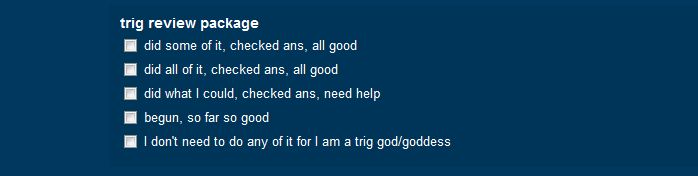
Aaaaaannnnnnnd I am just so sarcastic sometimes it is surely wrong:

Apparently there are several trig gods in my class, but sadly so far, no goddesses. Well, heaven help them, they had better be prepared to prove it.

Anyway, perhaps I should start calling them cheeklists.

Graphing trig functions using google drawings ..... and a box

I have developed what I think is a fun and easy way for my kids to graph a decent trig waveform by hand. I have always felt that actually graphing a few sine and cosine functions helps to understand the properties that only pertain to trig functions, like period and line of oscillation. This activity has been adapted many times over the years, and this time, it's in the cloud!

The basic steps of the graphing procedure:

They warm up by placing 5 key points inside a box, any box, like this, eyeballing it so that the 2nd, 3rd, and 4th points are halfway between everything else vertically and horizontally:

5 key points
Then they join those as smoothly and curvey-y as possible:

One cycle of the cosine function
Once they can do this in any-sized box I give them, they just have to do it on the cartesian graph. Which means THEY have to first draw the box.

So next, they calculate the correct locations of the box's corners on the cartesian graph. This is about 25 slides condensed into two:

Use max and min to get top and bottom of box
Use phase shift and period to get left and right ends of box

Now they can place the 5 key points in this box, which just happens to be on a real grid:


This makes it pretty easy to repeat and draw as many cycles as they want:


Of course we then extend to the sine curve, and then to using a regular x-axis, as opposed to one with all those π's all over it.

So how did this go into the cloud?

First I put the above procedure on a voicethread, which they were to watch at home. Then I put some practice examples onto a googledocs drawing, like this. Next day, in class, I gave the students the link, did a quick demo of two tools: the rectangle tool, and the scribble line tool, and we were off to the races.

So how well does it work?

As usual, my answer is...........it depends. If you measure the success by how much fun they had and how engaged they were, it was pretty successful. Lots of laughs (or lols) at how wobbly some curves were! I was also able to correct some mistakes right off the bat because I could see what they were doing as they were doing it, so as an intervention, it was also successful. As a collaborative activity, it was so-so, for as usual I decided who would work with whom. As a pure practice activity, not bad, only had time to do two functions, and I had prepared 4. I'm pretty sure the slowness was not because of the tech, though, it was more about them being at the beginning of their trig curve-learning curve.

And the graphs? Well, I believe in full transparency, so here's their work, warts and all, (just a figure of speech, I think they are gorgeous)::

I thought they were pretty terrific, in fact, quite consistent, all things considered. I displayed them the next day to each group so they could compare, and it was interesting to hear the reactions. Some were impressed with how smooth some people were able to get their curves. One group's curves were a little too perfect, actually:


But they had found a way to follow the procedure AND improve on it! They had done their calculations and drawn the box, but found that by using the curve line tool instead of the scribbler, and hitting only the max and min, the curve automatically went through all 5 key points, and it looked beautiful! Which suggests to me that there must be some trig involved in the curve line tool.....so I learned something too!

A few organizational details:
  • When creating the practice activity, I went with the google drawing because I couldn't find the scribble tool on any other type of googledoc, but now I see that it's there in "Presentation" too.
  • I didn't have everyone working on one google drawing at the same time, because it tends to be too slow with that many people. I made a few copies and split the kinds into groups of 2 or 3.
  • Each of the copies' file names contained the names of the kids in that group, to help me keep the picture in my head of who was working with whom. I need a lot of help, what can I say.
  • When sharing, I set it so that everyone with the link could edit it, otherwise no one would be able to draw!
  • Since they were all still in the virtual class during all this, I put them into breakout rooms according to their groups, so that I could talk to one group at a time if needed.
  • I had them write their calculations on the classroom whiteboard instead of the google drawing. The scribbler is just terrible for writing. That also kept their graphs relatively clean.
  • While they were working, I was able to click from tab to tab and quickly know which group I was looking at because of the names in the file title.
Next time:
  • I'd like to add some suspense to it - maybe they are initially working on individual cycles, but they get stuck together so that in the end, if everyone has done it right, we get a nice long graph with lots of nice smooth sort-of-identical peaks and troughs. Everyone contributes to it, but only at the end.
  • More examples, and widely varying box sizes, just for fun. One really tall, skinny one, and one that is the width of the entire google drawing! 
Who knows what else will be different? The point is, I now have this post to read next time, plus I have everything I need saved in a folder called "Activities", which is a new folder type in my collection of stuff, PLUS I have student blogs like this one, giving me great ideas, like calling it a box, instead of a rectangle!

Wednesday, February 22, 2012

Confessions of an un-cooperative learner

Now that I have come full circle with flipping, that is to say, it has been a year since I started flipping, I can use some of the voicethreads and videos I used last year. Punched up a bit of course, but it should get a bit easier to be prepared. Which means I can focus on the class activities, to make them more interesting, collaborative, and authentic.

How can I ask kids to do something I wouldn't want to do?

The collaboration part is the hardest for me. I have always struggled with putting kids into groups, probably because I have never liked working in groups myself. As a young teacher (which was just last week....) I was decidedly uncooperative about cooperative learning! I guess I wouldn't make a very good dolphin. They clearly do everything in cooperative groups.

I wonder if there's a dolphin off-camera thinking "Meh."
I think part of the problem is that it all seems so un-authentic to me. Whenever I was put into some group for a workshop, I thought "Why should I work with people that I don't know and would ordinarily not want to have anything to do with, and who don't seem any more jazzed about this than I am?" So I know how the kids feel. And even if the kids DO want to work with someone else, THEY should be choosing who it is, not me. And then there's the task, which always seemed so contrived, like pretend you are organizing this, and your task is to do that....enough pretending already.

But my inner dolphin is emerging!

Our team at Learn did a fabulous group presentation last week at LCEEQ, which was clearly greater than the sum of its parts, so I get it now. And I watched this video a while ago that got the cooperative ball rolling:


I recognize fully that learning is a social activity, or at least it should sometimes be. So I have been trying to come up with ways to just get groups to form organically. Kids wanting to work together because of an authentic reason that doesn't involve marks, or teacher direction, or pretending. And like most things, the ideas come to me when I am not particularly looking for them, or ready for them.

The other day in my grade 10 class, this happened:

Two kids who are always ahead of everyone else, which is to say, they do things on time, and they are both very strong students, both happened to have questions on the same assigned textbook examples. Wanting to be efficient, I took them into a break out room to help them both out, just trying to save time. I gave a bit of help, then I got an idea. I proposed that they just stay in that room together since they're working on the same thing, and they might be able to help each other out.  They were ok with it. Then I left, and returned a few minutes later, without them seeing that I was back (ZENlive, our virtual classroom, has many tricks like that) ....and they were actually working together, discussing, asking, writing on the board. And when class was over, they stayed there to finish the work!

Then a few days later, in my grade 11 class, this happened:

Exactly the same setup, but this time, five students. When I went back in to check, nothing was happening. :(  What was different: this was a group of five, not two. That might have been all there was to it. But the task was also a lot easier, so there was no compelling reason for them to collaborate. And I explained it all.

So here's what I'll do next time:

Plant a seed in the assigned work that will get a lot of questions to lure them in, then put them in a group, and then shut myself up! I'll just say here, you guys all have the same question, see if you can put your heads together.  Good luck, get cracking.

Me tell you? What do I look like, a dolphin?

Friday, February 3, 2012

Start with the students

Here's what I've been doing since my last post, wow, almost a month ago, just shows how productive I've been, if I do say so myself:
  • got student blogs going
  • got class blog set up, and all of their blogs are linked to it
  • tried out and LOVED in-class live collaborative editing using googledocs
  • fixed it so that during this live editing we can all see each others' names next to our cursors (instead of "anonymous user")
  • added students as googledocs contacts, in groups by course (that was how to do the above)
  • set up "form emailer" - so that as soon as kids submit something to the checklist, they will receive an email listing everything they checked off/said (got that from the script gallery at gdocs, my new favourite shopping place)
  • started using my gmail account finally - mainly because it's the only one my groovy new smartphone will allow me to look at for now
  • geogebra - made tons of new worksheets, including ones with sliders and conditional colouring
So now I have to post in more detail about all this, in case there is anyone out there who wants to know how to, or just see how all these things look and feel. That should take.....a while. But here goes. Starting with the blogs:

Student blogs and class blog:

Before I could set this up, I had to get a big picture. Like some sort of structure of the blogs, who do I want linked to whom, how would it look, how do I start....I got really hung up on that. Then my fabulous fellow online teacher Paul told us about how he did it with his history students, and it all became crystal clear. Start with the students. Have them create their own blogs first, if they don't already have one. This is just a sort of pictorial representation of how it all looks in my wee head:


More detail to come, but feel free to comment or give feedback, either right in the voicethread, or here!